
How to create construction progress reports using drone surveys

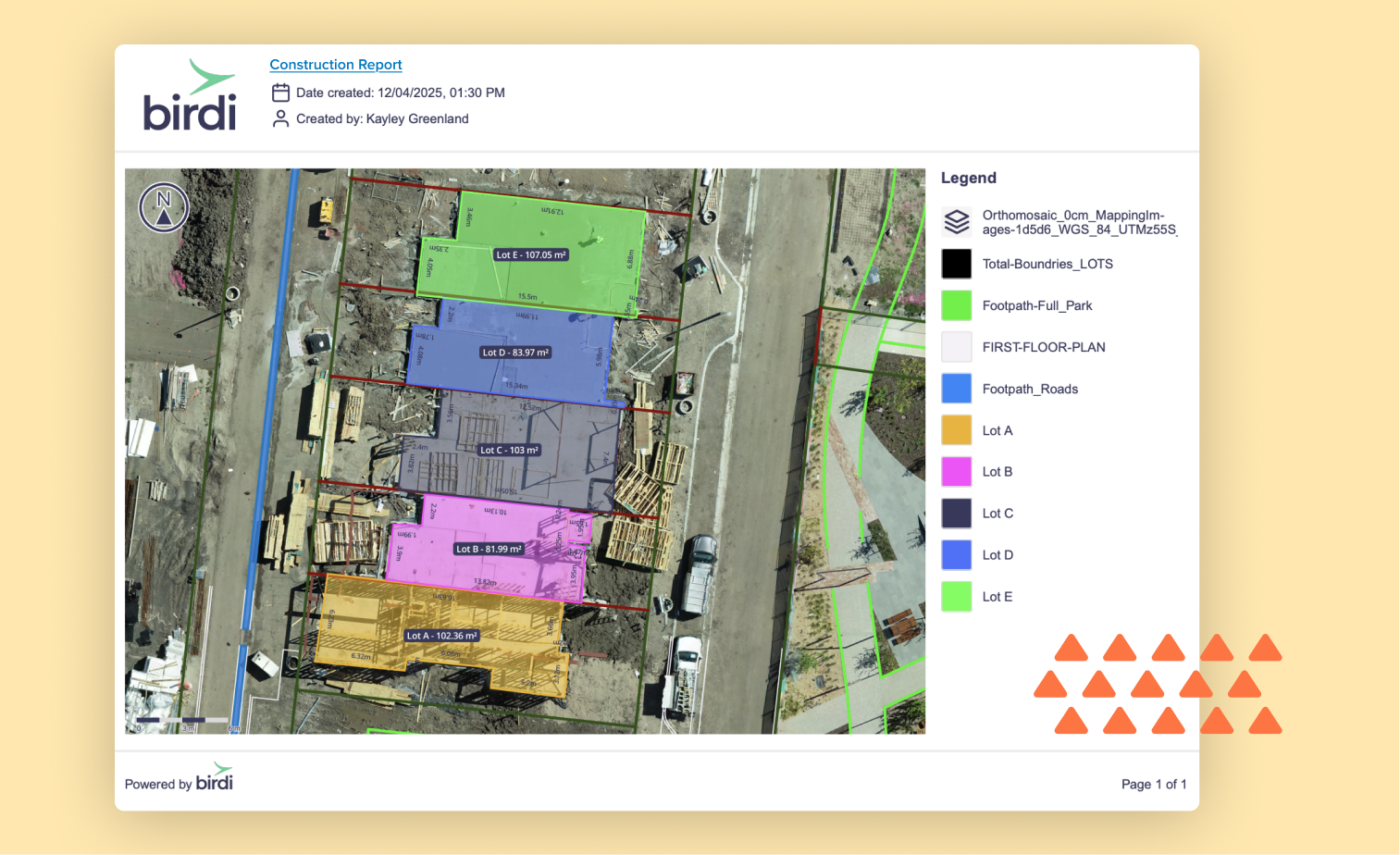
TL;DR: To create construction progress reports using drone surveys, fly the site on a regular cadence, process imagery into orthomosaics and elevation models, compare outputs against the baseline and design plans, then share annotated maps and volumetric data with stakeholders. The result is an objective, timestamped record that replaces slow manual inspections.
Key takeaways
- Drones can survey up to 120 acres per hour, compared to roughly 5 acres per hour using traditional ground methods — a 24-fold increase in coverage speed.
- Drone surveys can achieve horizontal accuracy within 1–3 cm using RTK/PPK-equipped drones — sufficient for most progress monitoring workflows. For accuracy-critical applications like volumetric reporting or payment certification, ground control points (GCPs) should be used to validate the model.
- The construction drones market was valued at $4.6 billion in 2024 and is projected to reach $7.1 billion by 2030, reflecting industry-wide adoption.
- A consistent flight cadence from preconstruction through closeout builds a time-stamped visual record that supports progress tracking, payment verification, and owner reporting.
- Sharing processed drone data — not just raw imagery — is what transforms a flight into a useful progress report.
Why do construction teams struggle with progress reporting?
Traditional construction progress reporting is time-consuming, inconsistent, and often too infrequent to catch issues early. Site managers walking a large project on foot can spend days gathering measurements that are already out of date by the time they reach stakeholders.
The core problem is one of scale and speed. A complex construction site changes daily — earthworks advance, structures go up, materials move — but traditional survey methods can only capture a snapshot every few weeks. According to UAV Coach, a single drone can survey a 100-acre site in under an hour, whereas ground-based methods would take a team several days to cover the same area. That gap between the pace of change and the pace of reporting is where cost overruns and scheduling disputes take root.
Progress reports also suffer from subjectivity. Two site managers walking the same site can come away with different readings on how complete a section is. Drone-derived orthomosaics and digital elevation models (DEMs) replace that judgment call with measured, georeferenced data that everyone on the project is looking at the same way.
What data does a drone survey produce for a construction report?
A single drone flight captures the raw imagery needed to produce four core outputs: a georeferenced orthomosaic, a digital elevation model (DEM), a 3D point cloud or mesh, and timestamped photographs tied to GPS coordinates. These deliverables are generated after the flight, when the imagery is processed through a photogrammetry platform.
Each output serves a different reporting purpose. The orthomosaic — a stitched, distortion-corrected aerial map — gives project managers a plan-view comparison against the approved design. Overlaying the current orthomosaic on the original design drawing immediately shows where work is ahead, behind, or deviating from plan. The DEM enables volumetric calculations: how much fill has been placed, how much cut remains, whether stockpile volumes match the bill of materials. The 3D mesh or point cloud is most useful for structural progress checks and BIM integration, particularly on above-ground works. The timestamped photos form the legal and contractual record — indexed to location, they make it straightforward to demonstrate what condition a section of site was in on a given date.
According to Vantage Aerial Works, design overlay comparisons — where the current orthomosaic is layered against the approved design — are among the most valuable deliverables for site managers and owners, as they make deviations visible at a glance without requiring GIS expertise.
How do you plan a drone survey for construction progress monitoring?
Effective construction progress monitoring starts with a flight plan that can be repeated identically on every survey, so that changes between flights reflect real site conditions rather than differences in how the data was captured.
Set up a baseline before construction begins. The preconstruction survey establishes the ground truth: existing topography, stockpile positions, drainage features, and any pre-existing conditions that could later become the subject of a dispute. Without this baseline, every subsequent survey is floating — you can measure the current state but not the change.
Define consistent flight parameters. Fix the flight altitude, overlap percentage, and flight path in your planning software before the first flight and lock them in for every subsequent survey. For most construction applications, a flight altitude of 80–120 metres with 75–80% front and side overlap delivers the resolution and point density needed for centimetre-level accuracy. Varying these parameters between flights introduces noise into the change detection.
Consider ground control points (GCPs) for accuracy-critical work. GCPs are physical targets placed at known coordinates on the ground, used to validate the accuracy of the georeferenced model. For most progress monitoring — tracking visual change, comparing orthomosaics, documenting site conditions — RTK (real-time kinematic) or PPK (post-processed kinematic) GPS corrections built into modern survey drones provide sufficient accuracy without GCPs. Where the data will be used for volumetric reporting or payment certification, GCPs provide a stronger accuracy foundation — they are precisely surveyed points at known real-world coordinates, so the photogrammetry software can anchor the model to those positions and ensure outputs are correctly aligned to the ground rather than floating relative to GPS alone. According to Wingtra, academic studies confirm that UAV photogrammetry achieves centimetre-level accuracy when flights use RTK or PPK GNSS correction combined with well-distributed checkpoints.
Schedule flights around key project milestones. For earthworks and infrastructure, weekly or fortnightly flights aligned with payment claims are typical. For vertical construction, bi-weekly flights tied to programme milestones — slab pours, structural frames, façade completion — are more useful than a fixed calendar interval.
How do you process drone survey data into a usable progress report?
Raw drone imagery is not a progress report. Processing turns thousands of overlapping photographs into the measurable, shareable outputs that stakeholders actually need.
The standard processing workflow runs in three stages. First, a drone photogrammetry platform stitches the images into an orthomosaic and generates a dense point cloud from the overlapping imagery. This step typically runs automatically once imagery is uploaded, taking between one and four hours depending on image count and processing tier. Some platforms — like Birdi — handle both photogrammetry processing and team collaboration in one place, so once processing completes, outputs are immediately available on the project map without needing to export files and move them to a separate sharing tool. Second, if GCPs were used during capture, the processed outputs should be checked against those known coordinates to confirm alignment before sharing with stakeholders. Third, the outputs are ready in the formats the rest of the team needs: GeoTIFF for the orthomosaic, LAZ for the point cloud, and GLB or OBJ for the 3D mesh.
The reporting layer sits on top of this processed data. Comparison maps showing change between surveys, volumetric calculations from DEM-to-DEM analysis, and annotated photographs with comments pinned to specific locations all need to be assembled into a format that a project owner or superintendent can read without GIS training. This is where the choice of platform matters: exporting a GeoTIFF to an email attachment is not the same as sharing an interactive map where a project owner can zoom in, leave a comment, and compare this week's flight to last month's.
How often should you fly a construction site for progress reporting?
The right flight frequency depends on the phase of construction and the rate of change on site. Flying too infrequently means missing critical changes; flying every day on a slow-moving project wastes budget without adding reporting value.
A practical cadence for most projects is:
- Preconstruction: One baseline flight before any earthworks begin.
- Earthworks and bulk excavation: Weekly flights, timed to align with payment claims so volumetric data can support certification.
- Structural construction: Fortnightly flights, timed to milestone completions (slabs, frames, envelope).
- Fitout and finishing: Monthly flights, primarily for contractual documentation rather than active progress tracking.
- Practical completion: One final flight to establish the as-built record.
According to StruxHub, repeatable flights on the same path ensure that changes between surveys reflect actual site conditions — not inconsistencies in how the data was captured. Setting up automated flight planning — where the drone follows an identical path each time — removes the human variability that can corrupt a change-detection workflow.
For high-value or fast-moving projects, some teams supplement scheduled flights with triggered flights: whenever a major earthwork event occurs, a flight is scheduled within 24 hours to capture the before-and-after record.
What should a construction drone progress report include?
A well-structured drone progress report communicates the current state of the site, the change since the last survey, and any deviations from the approved design — in a format readable by both technical and non-technical stakeholders.
A practical report template includes:
- Cover summary — Project name, survey date, and a two-to-three sentence written summary of key findings.
- Orthomosaic comparison — Side-by-side or overlay view of the current survey against the previous period and the original design.
- Progress highlights — Annotated map callouts identifying sections that have advanced, stalled, or deviated from plan.
- Volumetric data — Cut, fill, and stockpile volumes with comparison to schedule and bill of quantities.
- Photographic record — Selected site photographs geo-tagged and indexed to the map.
- Issues log — Any identified deviations, safety concerns, or items requiring follow-up, with the map location pinned.
- Next survey date — To close the reporting loop and set expectations.
The report doesn't have to be a PDF. Increasingly, teams share a link to a live map where a project owner can zoom in, view annotations, and compare surveys directly — no document assembly required. Whether it's a formatted document or an interactive map, the goal is the same: a project owner reviewing progress from a head office should be able to understand the site condition without needing a call with the site manager to interpret the data.
How should you choose a platform for sharing drone survey outputs?
When choosing how to share drone survey outputs, look for a platform that keeps processed data, annotations, and stakeholder access in one place — rather than emailing files that quickly become disconnected from the project record.
The key questions to ask are: Can non-technical stakeholders view and comment on the data without downloading specialist software? Can you compare multiple surveys side by side? Does the platform store an audit trail of comments and annotations? And can it accept the output formats your photogrammetry software produces — GeoTIFF, LAZ, GLB?
For construction teams that need a straightforward way to share drone outputs across technical and non-technical staff, Birdi is worth considering. Teams can upload already-processed outputs — orthomosaics, DEMs, point clouds, and 3D models — or upload raw drone imagery and run photogrammetry processing directly within the platform. Either way, outputs sit on a shared project map where anyone on the team can view, annotate, and comment without needing GIS training. Mirvac, one of Australia's largest construction groups, reported saving 32 hours per site per month on progress reporting after centralising drone outputs in Birdi. That said, teams that need deep GIS analysis — raster algebra, network datasets, complex spatial modelling — may find a full GIS platform like ArcGIS better suited to their workflow.
Whatever platform you use, the principle is the same: the value of a drone survey is not in the raw imagery, but in how efficiently processed outputs reach the people who need to act on them.
Frequently asked questions
How accurate are drone surveys for construction progress reporting?
Drone surveys using RTK/PPK-equipped drones can achieve horizontal accuracy within 1–3 cm — sufficient for most construction progress monitoring. For accuracy-critical applications like volumetric reporting or payment certification, ground control points (GCPs) should be used to independently validate the model. For general visual progress tracking and change detection, RTK/PPK correction alone is typically adequate.
How long does it take to process a drone survey into a usable report?
For a typical construction site of 20–100 acres, photogrammetry processing takes between one and four hours after upload, depending on image count and processing tier. Preparing the actual report — adding annotations, running volumetric comparisons, and formatting for stakeholders — takes an additional one to three hours. With automated processing pipelines and a standard report template, many teams can turn around a weekly report within a single working day of the flight.
Do you need a licensed drone pilot for construction progress surveys?
In most jurisdictions, yes. In Australia, for example, the Civil Aviation Safety Authority (CASA) requires operators flying drones over 250 g in commercial contexts to hold a Remote Pilot Licence (RePL) and operate under a certified drone operator. Requirements vary by country and by the complexity of the airspace involved. Always check the current regulations with your national aviation authority before starting a monitoring programme.
Can drone surveys replace traditional surveyors on a construction project?
Drone surveys augment rather than replace licensed surveyors in most construction contexts. Drones excel at frequent, large-area progress monitoring and volumetric change detection. Licensed surveyors are still required for cadastral surveys, setting out works to design, and any measurements that carry legal or contractual weight in jurisdictions where only a registered surveyor can certify. The most effective programmes use drones for regular monitoring cadence and surveyors for specific certification events.
What file formats should construction drone surveys be exported in?
The most commonly required formats are: GeoTIFF for orthomosaics (compatible with GIS, CAD, and most visualisation platforms), LAZ or LAS for point clouds, GLB or OBJ for 3D meshes, and XYZ or CSV for extracted spot elevations. If the data needs to go into a BIM environment, check whether your photogrammetry or collaboration platform can export to RCP (Autodesk ReCap) or E57 for direct Revit and Civil 3D integration.
Sources
- Wingtra. "Drone Surveying Accuracy: How It Works and What to Expect." Wingtra Blog, 2025. https://wingtra.com/surveying-gis/
- StruxHub. "Drone Surveying Best Practices for Construction Superintendents." StruxHub Blog, 2025. https://struxhub.com/blog/drone-surveying-best-practices-for-construction-superintendents-precision-mapping-for-smarter-industrial-workflows/
- Vantage Aerial Works. "Drone Construction Progress Monitoring (2026 Guide)." Vantage Aerial Works Blog, 2026. https://vantageaerialworks.com/blog/drone-construction-progress-monitoring
- UAV Coach. "Drones in Construction: An In-Depth Guide [New for 2026]." UAV Coach, 2026. https://uavcoach.com/drones-in-construction/
- RoboticsTomorrow. "How Drone-Based Construction Progress Monitoring Is Driving Smarter Industrial Workflows." RoboticsTomorrow, April 2026. https://www.roboticstomorrow.com/article/2026/04/how-drone-based-construction-progress-monitoring-is-driving-smarter-industrial-workflows/26295