
How to Build Branded Client Progress Reports From Drone Data

TL;DR: To build branded client progress reports from drone data without rebuilding each one, write every client's report rules once, build the first report carefully with your AI assistant, and save it as that client's template. Each month, one request per client produces the report with fresh figures and imagery from your mapping platform, in that client's format.
Key takeaways
- The cost is the rework, not the report. The same progress report gets rebuilt for every client, in their branding, sections and units.
- Time lost to finding information is not new. According to a 2018 FMI and PlanGrid study, construction professionals spent 35% of their time on non-optimal activities, including looking for project data.
- AI use in construction is rising fast. According to RICS, about two-thirds of construction professionals used AI in some form in 2026, though only 19% used it regularly.
- One template per client keeps it clean. Each client's branding and rules stay separate, so a change for one never breaks another.
- The figures must come from the mapping platform. The assistant assembles the report; it should never calculate a quantity itself.
What does a client progress report need to show?
A client progress report needs a dated visual record of the site, what changed since the last report, the quantities that matter for the contract, and the capture date and method behind every figure. It should answer the client's real question, which is usually whether the work is where it should be, before showing the detail.
Different clients read for different things. An owner who never visits wants a clear picture of progress. A head contractor wants quantities they can check against a claim. An investor wants a summary they can forward. As a result, the same site data turns into three or four different reports.
What should every report contain?
- A dated aerial image of the whole site, from the latest capture.
- A comparison with the previous capture, either side by side or as change.
- Quantities where the contract depends on them, such as earthworks volumes.
- Notes on what changed, in plain language.
- The capture date and method, so the client can trust the numbers.
Why does the same report get rebuilt for every client?
Because each client wants it their way. One wants their logo and metric units, another wants a specific section order, and a third wants it uploaded to their project system. The site data is the same, but someone reformats it for every client, every month. That rework, not the capture, is where the time goes.
Looking for information has long been a drain on construction time. According to a 2018 study of nearly 600 construction leaders by FMI and PlanGrid, respondents spent 35% of their time on non-optimal activities. Among these, they spent about five and a half hours a week looking for project data. Reformatting the same report for each client is a modern version of the same problem.
AI assistants are now a realistic way to remove that rework. According to the RICS AI in Commercial Property and Construction Report 2026, about two-thirds of construction respondents used AI in some form, up from just over half a year earlier. However, regular use was only 19%, which suggests most teams haven't yet found a routine job to hand over. A monthly client report is a strong candidate.
How do you set up one template per client?
Write each client's rules once in plain language, build their first report with your assistant's most capable model, agree the checks it should run, and then save it as that client's template. Keep one template per client. Each one holds that client's branding, units, sections and sign-off wording, so their reports stay consistent month to month.
Step 1: Write the client's rules
Write them as you would brief a new colleague: the logo, metric or imperial units, the sections in order, the imagery for each area, and the sign-off wording. If you'd tell a person, tell the assistant.
Step 2: Build the first report and agree the checks
Ask for the first report in plain language. For example: "Compare the August and September earthworks on Gregory Hills and draft the progress summary for the client." Then go through the draft together. Agree the checks it must run, such as both captures covering the same boundary and both falling in the reporting period.
Step 3: Save it as the client's template
Ask the assistant to save the layout and rules as a template for that client. For one team, keep templates in a project, a shared space in the assistant for files and house rules. If several people produce reports for many clients, save them as an organization-wide skill instead.
How do you run each client's report every month?
Ask for each report in one sentence, naming the client and the period. The assistant pulls fresh figures and imagery from your mapping platform, fills that client's template and produces the finished report. A faster, lower-cost model is usually enough for the monthly run, because the template already says exactly what to do.
Check the first few reports for each client carefully before they go out. Once a template has proved itself, review becomes a quick read rather than a rebuild. For a firm reporting to several clients, that is the real saving: the work scales with the number of templates, not the number of reports.
Firms that capture for several clients get the most from this. With Birdi (birdi.io), a geospatial workspace for construction and mining teams, the Birdi AI connector produces reports like these on any paid plan, with read-and-act access. You own the templates and can change them whenever you like, and Birdi has starter templates for some report types.
How do you get site imagery into the report?
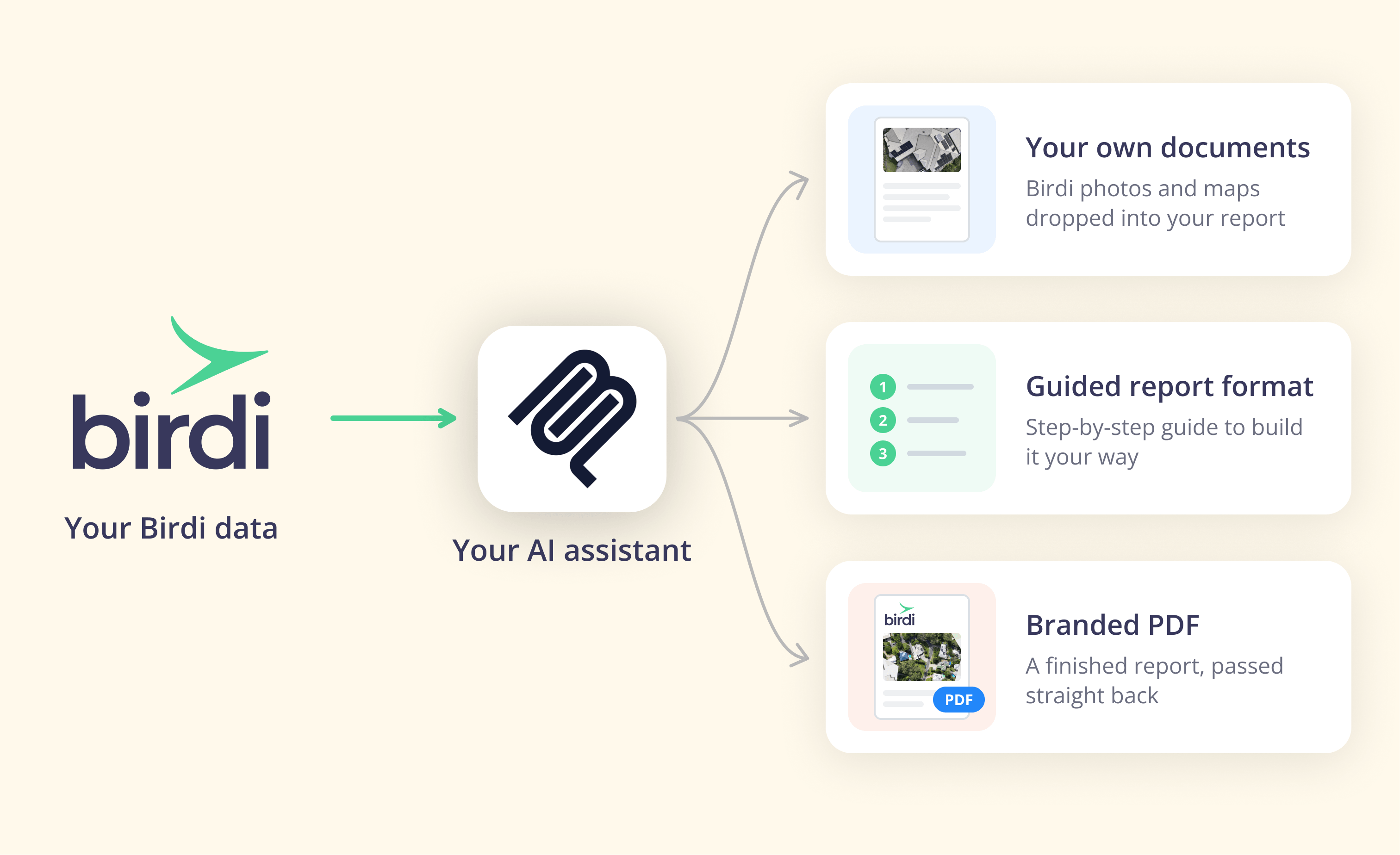
There are three common approaches: the assistant fetches links to map images and drone photos and places them in a document it builds in your format; the platform gives the assistant a step-by-step guide for a consistent result; or the platform produces a finished, branded PDF when the assistant can't download images itself.
Which approach fits depends on your assistant and your client. If the client wants a Word or Google document in their own format, the first approach suits. If you need identical output every month, the guided approach is more predictable. Meanwhile, if your assistant can't handle images, the branded PDF is the reliable fallback.
In Birdi, all three are available through the connector. Report downloads use secure, time-limited links, so ask for a fresh link if one expires. For the general method of turning drone surveys into progress reports, see the drone progress report guide.
How do you keep the numbers defensible?
Keep every quantity coming from the mapping platform, state the capture date and method on the report, treat any AI description of the site as a second opinion, and have a person who knows the project sign off the first reports. A client can then trace any figure back to a survey, which is what makes a report defensible.
An assistant that can look at a map is useful for drafting a summary. However, a description is not a measurement. In Birdi, for example, visual descriptions are described as a second pair of eyes, not a qualified assessment, and measurements and volumes come straight from Birdi in the map's units.
It also helps to be clear about what this method is not. It doesn't detect installed work or measure percent complete by trade; that is a different category of tool. In addition, it doesn't put the report into a client's project system by itself, so somebody still uploads it, or an assistant connected to that system does.
Who does this suit?
If your firm reports to several clients who each want something different, Birdi is a sensible option to try, because each client's template stays yours and the numbers stay Birdi's. However, a team that needs automated percent-complete tracking against a schedule will want a dedicated progress-tracking product. For a wider view, see the progress reporting software roundup.
Frequently asked questions
Can AI write a construction progress report?
Yes, if the figures come from your mapping platform and a person reviews the result. An AI assistant connected to your site data can assemble images, quantities and a written summary into your template. It should not estimate quantities itself, and its description of the site is a draft for someone who knows the project to check.
How do I brand a drone report for each client?
Write each client's branding and rules into a separate template: logo, units, sections, imagery and sign-off wording. Build the first report with your AI assistant, agree the checks, and save it. Each month, ask for that client's report by name, and the template applies their branding to fresh figures.
How often should construction progress be reported?
The contract usually sets the frequency, and monthly reporting often lines up with payment claims. Fast-moving phases such as earthworks may justify fortnightly or weekly capture. Agree the cadence with each client at the start, and set the template to the same period, so reports and claims line up.
Can the report go straight into Procore?
Not by itself. The mapping platform produces the report, and someone uploads it to the client's project system. An AI assistant that is also connected to that system may be able to carry the file across, but that depends on the assistant and the system's own connector, not on the mapping platform.
Does this method measure progress as percent complete?
No. This method assembles a report from surveyed data, quantities and imagery that your team captures. Measuring percent complete by trade requires software that detects installed work automatically, which is a different category of tool. Choose based on whether your clients need a visual record with quantities or automated progress tracking.
About the author
This guide was written by the Birdi team. Birdi (birdi.io) is a geospatial AI workspace that construction and mining teams use to share drone, 360 and design data in one map, and the Birdi AI connector links it to AI assistants. We read every source on October 19, 2026, and list each one below.
Related reading
- Connecting your AI assistant: which assistants support connectors, and what each allows.
- Automating the stockpile report: the same method, for month-end volumes.
- Drones in progress reporting: how drone capture changed construction reporting.
- Birdi for construction: how construction teams use Birdi across projects.
Sources
Research
- FMI and PlanGrid. "Construction Disconnected" (2018), as reported in Construction Dive, "Industry could be overspending $177B per year, study finds." https://www.constructiondive.com/news/industry-could-be-overspending-177b-per-year-study-finds/529450/
- RICS. "AI in Commercial Property and Construction Report 2026." August 18, 2026. https://www.rics.org/news-insights/ai-in-commercial-property-and-construction-report-2026
Birdi
- Birdi Help Center. "How to create reports with Birdi and your AI assistant." October 2026. https://help.birdi.io/en/articles/17592031-how-to-create-reports-with-birdi-and-your-ai-assistant
- Birdi Help Center. "How to connect Birdi to your AI assistant (Claude, ChatGPT, Copilot and Gemini)." October 2026. https://help.birdi.io/en/articles/17592014-how-to-connect-birdi-to-your-ai-assistant-claude-chatgpt-copilot-and-gemini