
Birdi's Stockpile model just got an upgrade: it now reads the terrain, not just the image

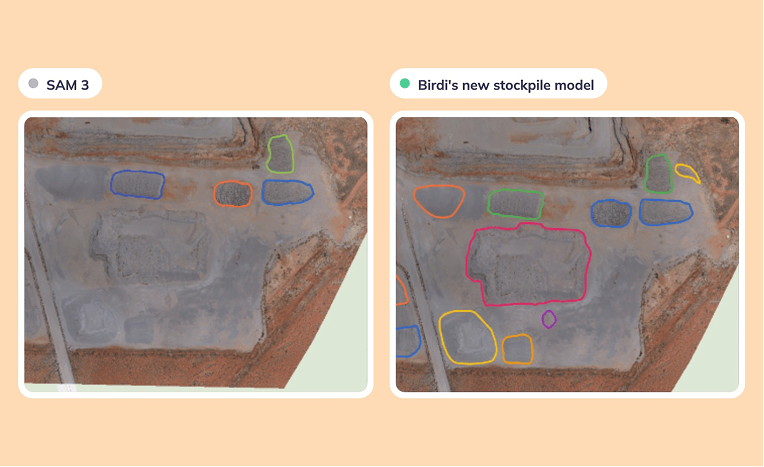
Every stockpile count starts the same way. Someone opens the latest map and works across the site, pile by pile, drawing the outlines that every volume depends on. On a large site with lots of material that takes a while, and the piles that blend into the ground around them are the easiest to miss.
AI Detect has been taking on that first pass, and today it gets better at it.
A new Stockpile model now replaces our earlier stockpile detection. It's trained on more than 15,000 real stockpiles, and it reads your DSM as well as your orthomosaic, so it sees the shape of the ground and not just its color. It finds more piles and outlines them more accurately, especially on large sites with lots of material.
(Available on Growth and Ultimate plans)
What's new
- Reads the terrain, not just the image: it uses the color of your orthomosaic plus the elevation and slope from your DSM, so it can tell a pile apart from flat ground of a similar color, or from a shadow
- Trained on real stockpiles: more than 15,000 of them
- Tested on sites it had never seen: it found about 81% of stockpiles, and 86% of the outlines it drew were stockpiles
- Ready to calculate: results land on your map as volume annotations, in their own folder
- Runs in the background: close the panel, or even the map, and detection keeps running on the server
What you'll need
- A Growth or Ultimate plan
- A processed orthomosaic of your site
- A DSM from the same survey. The model uses it to read the shape of each pile, so it won't run without one
The Stockpile model runs on a full orthomosaic only. It isn't available in Map Canvas AI Detect or Media AI Detect, because those don't have elevation data.
Where to look when you check the results
Those test figures mean the model will miss some piles and draw a few outlines that aren't stockpiles. That's why results arrive as annotations you can edit, not as a finished number. AI detections are built to support expert review rather than replace it.
It works best on open, well-defined piles on active sites. Look more closely at:
- Piles that touch: neighbors sometimes come out as one outline, so split them before you calculate
- Recycling and mixed-material sites: irregular, low or patchy piles are harder to detect, so expect to add a few by hand
- Covered material: covered grain bunkers aren't detected, and anything under tarps or in covered bunkers should be drawn by hand
- The edge of your survey: partly captured piles may be outlined only in part
Getting set up
- Open your map and select the survey you want to analyze.
- Click AI Detect, then choose Tag orthomosaic and select your orthomosaic.
- Choose Birdi's Stockpile Model, then the DSM from the same survey.
- Click Detect objects. When it finishes, a new folder of volume annotations appears in your Layers panel.
- Review the outlines: delete anything that isn't a stockpile, adjust outlines, split merged piles and draw any that were missed.
- Calculate volumes: hold Shift, select your stockpiles, choose your Volume DEM and Base method, then click Calculate.
- Add tonnage and export: choose a Material, then open Table View to review and export your results.
The full step-by-step walkthrough is in our Knowledge Base: How to detect stockpiles automatically with Birdi's Stockpile model
FAQ
Which plans include the Stockpile model?
Growth and Ultimate.
Does it calculate volumes automatically?
No. Detected stockpiles arrive as volume annotations, ready to calculate. You review them, choose your Volume DEM and Base method, and click Calculate.
Do I need a DSM?
Yes, from the same survey as your orthomosaic. A DSM from a different flight won't line up with the imagery, and the results will be poor.
Does 81% mean my volumes are 81% accurate?
No. Those figures describe how many piles the model finds, not how close a volume is. Volume accuracy depends on your survey data and the outlines you confirm.
Less tracing, more checking
Let the model draw the first pass, and spend your time on the piles that need a second look.
👉 Learn more in the Knowledge Base
Related reading: How to turn your stockpile AI Detect results into a volumetric report · How to automate a month-end stockpile volume report · How accurate is AI stockpile detection?